HAL - Hypertext Application Language
A lean hypermedia type
- Author: Mike Kelly <[email protected]>
- Created: 2011-06-13
- Updated: 2013-09-18 (Updated)
Summary
HAL is a simple format that gives a consistent and easy way to hyperlink between resources in your API.
Adopting HAL will make your API explorable, and its documentation easily discoverable from within the API itself. In short, it will make your API easier to work with and therefore more attractive to client developers.
APIs that adopt HAL can be easily served and consumed using open source libraries available for most major programming languages. It's also simple enough that you can just deal with it as you would any other JSON.
About The Author
Mike Kelly is a software engineer from the UK. He runs an API consultancy helping companies design and build beautiful APIs that developers love.
Quick links
- A demo API using HAL called HAL Talk
- A list of libraries for working with HAL (Obj-C, Ruby, JS, PHP, C#, etc.)
- A list of public hypermedia APIs using HAL
- Discussion group (questions, feedback, etc)
General Description
HAL provides a set of conventions for expressing hyperlinks in either JSON or XML.
The rest of a HAL document is just plain old JSON or XML.
Instead of using ad-hoc structures, or spending valuable time designing your own format; you can adopt HAL's conventions and focus on building and documenting the data and transitions that make up your API.
HAL is a little bit like HTML for machines, in that it is generic and designed to drive many different types of application via hyperlinks. The difference is that HTML has features for helping 'human actors' move through a web application to achieve their goals, whereas HAL is intended for helping 'automated actors' move through a web API to achieve their goals.
Having said that, HAL is actually very human-friendly too. Its conventions make the documentation for an API discoverable from the API messages themselves. This makes it possible for developers to jump straight into a HAL-based API and explore its capabilities, without the cognitive overhead of having to map some out-of-band documentation onto their journey.
Examples
The example below is how you might represent a collection of orders with hal+json. Things to look for:
- The URI of the main resource being represented ('/orders') expressed with a self link
- The 'next' link pointing to the next page of orders
- A templated link called 'ea:find' for searching orders by id
- The multiple 'ea:admin' link objects contained in an array
- Two properties of the orders collection; 'currentlyProcessing' and 'shippedToday'
- Embedded order resources with their own links and properties
- The compact URI (curie) named 'ea' for expanding the name of the links to their documentation URL
application/hal+json
{
    "_links": {
        "self": { "href": "/orders" },
        "curies": [{ "name": "ea", "href": "http://example.com/docs/rels/{rel}", "templated": true }],
        "next": { "href": "/orders?page=2" },
        "ea:find": {
            "href": "/orders{?id}",
            "templated": true
        },
        "ea:admin": [{
            "href": "/admins/2",
            "title": "Fred"
        }, {
            "href": "/admins/5",
            "title": "Kate"
        }]
    },
    "currentlyProcessing": 14,
    "shippedToday": 20,
    "_embedded": {
        "ea:order": [{
            "_links": {
                "self": { "href": "/orders/123" },
                "ea:basket": { "href": "/baskets/98712" },
                "ea:customer": { "href": "/customers/7809" }
            },
            "total": 30.00,
            "currency": "USD",
            "status": "shipped"
        }, {
            "_links": {
                "self": { "href": "/orders/124" },
                "ea:basket": { "href": "/baskets/97213" },
                "ea:customer": { "href": "/customers/12369" }
            },
            "total": 20.00,
            "currency": "USD",
            "status": "processing"
        }]
    }
}
The HAL Model
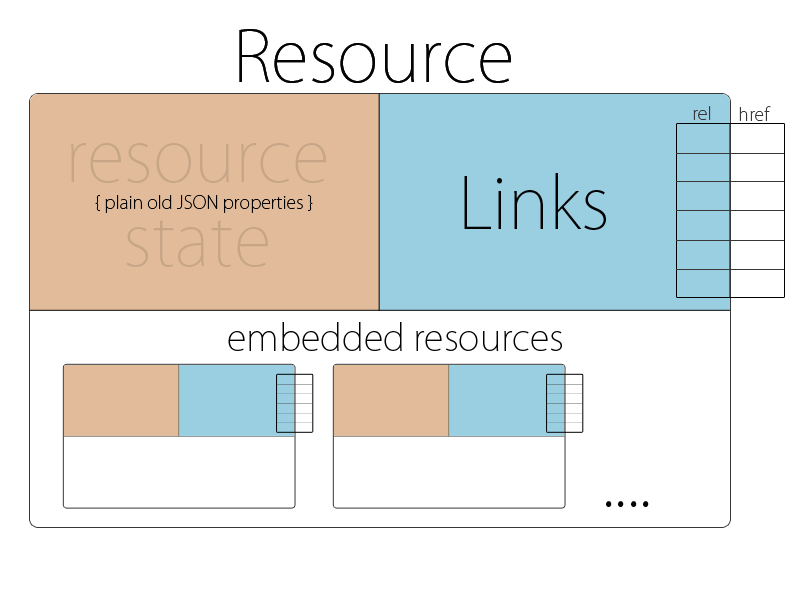
The HAL conventions revolve around representing two simple concepts: Resources and Links.
Resources
Resources have:
- Links (to URIs)
- Embedded Resources (i.e. other resources contained within them)
- State (your bog standard JSON or XML data)
Links
Links have:
- A target (a URI)
- A relation aka. 'rel' (the name of the link)
- A few other optional properties to help with deprecation, content negotiation, etc.
Below is an image that roughly illustrates how a HAL representation is structured:
How HAL is used in APIs
HAL is designed for building APIs in which clients navigate around the resources by following links.
Links are identified by link relations. Link relations are the lifeblood of a hypermedia API: they are how you tell client developers about what resources are available and how they can be interacted with, and they are how the code they write will select which link to traverse.
Link relations are not just an identifying string in HAL, though. They are actually URLs, which developers can follow in order to read the documentation for a given link. This is what is known as "discoverability". The idea is that a developer can enter into your API, read through documentation for the available links, and then follow-their-nose through the API.
HAL encourages the use of link relations to:
- Identify links and embedded resources within the representation
- Infer the expected structure and meaning of target resources
- Signalling what requests and representations can be submitted to target resources
How to serve HAL
HAL has a media type for both the JSON and XML variants, whos names are application/hal+json and application/hal+xml respectively.
When serving HAL over HTTP, the Content-Type of the response should contain the relevant media type name.
The structure of a HAL document
Minimum valid document
A HAL document must at least contain an empty resource.
An empty JSON object:
{}
Resources
In most cases, resources should have a self URI
Represented via a 'self' link:
{
    "_links": {
        "self": { "href": "/example_resource" }
    }
}
Links
Links must be contained directly within a resource:
Links are represented as JSON object contained within a _links hash that must be a direct property of a resource object:
{
    "_links": {
        "next": { "href": "/page=2" }
    }
}
Link Relations
Links have a relation (aka. 'rel'). This indicates the semantic - the meaning - of a particular link.
Link rels are the main way of distinguishing between a resource's links.
It's basically just a key within the _links hash, associating the link meaning (the 'rel') with the link object that contains data like the actual 'href' value:
{
    "_links": {
        "next": { "href": "/page=2" }
    }
}
API Discoverability
Link rels should be URLs which reveal documentation about the given link, making them "discoverable". URLs are generally quite long and a bit nasty for use as keys. To get around this, HAL provides "CURIEs" which are basically named tokens that you can define in the document and use to express link relation URIs in a friendlier, more compact fashion i.e. ex:widget instead of http://example.com/rels/widget. The details are available in the section on CURIEs a bit further down.
Representing Multiple Links With The Same Relation
A resource may have multiple links that share the same link relation.
For link relations that may have multiple links, we use an array of links.
{
    "_links": {
      "items": [{
          "href": "/first_item"
      },{
          "href": "/second_item"
      }]
    }
}
Note: If you're unsure whether the link should be singular, assume it will be multiple. If you pick singular and find you need to change it, you will need to create a new link relation or face breaking existing clients.
CURIEs
"CURIE"s help providing links to resource documentation.
HAL gives you a reserved link relation 'curies' which you can use to hint at the location of resource documentation.
"_links": {
  "curies": [
    {
      "name": "doc",
      "href": "http://haltalk.herokuapp.com/docs/{rel}",
      "templated": true
    }
  ],

  "doc:latest-posts": {
    "href": "/posts/latest"
  }
}
There can be multiple links in the 'curies' section. They come with a 'name' and a templated 'href' which must contain the {rel} placeholder.
Links in turn can then prefix their 'rel' with a CURIE name. Associating the latest-posts link with the doc documentation CURIE results in a link 'rel' set to doc:latest-posts.
To retrieve documentation about the latest-posts resource, the client will expand the associated CURIE link with the actual link's 'rel'. This would result in a URL http://haltalk.herokuapp.com/docs/latest-posts which is expected to return documentation about this resource.
To be continued...
This relatively informal specification of HAL is incomplete and still in progress. For now, if you would like to have a full understanding please read the formal specification.
RFC
The JSON variant of HAL (application/hal+json) has now been published as an internet draft: draft-kelly-json-hal.
Acknowledgements
- Darrel Miller
- Mike Amundsen
- Mark Derricutt
- Herman Radtke
- Will Hartung
- Steve Klabnik
- everyone on hal-discuss
Thanks for the help :)


